Screen Shot 2012-04-03 at 10.17.16 AM


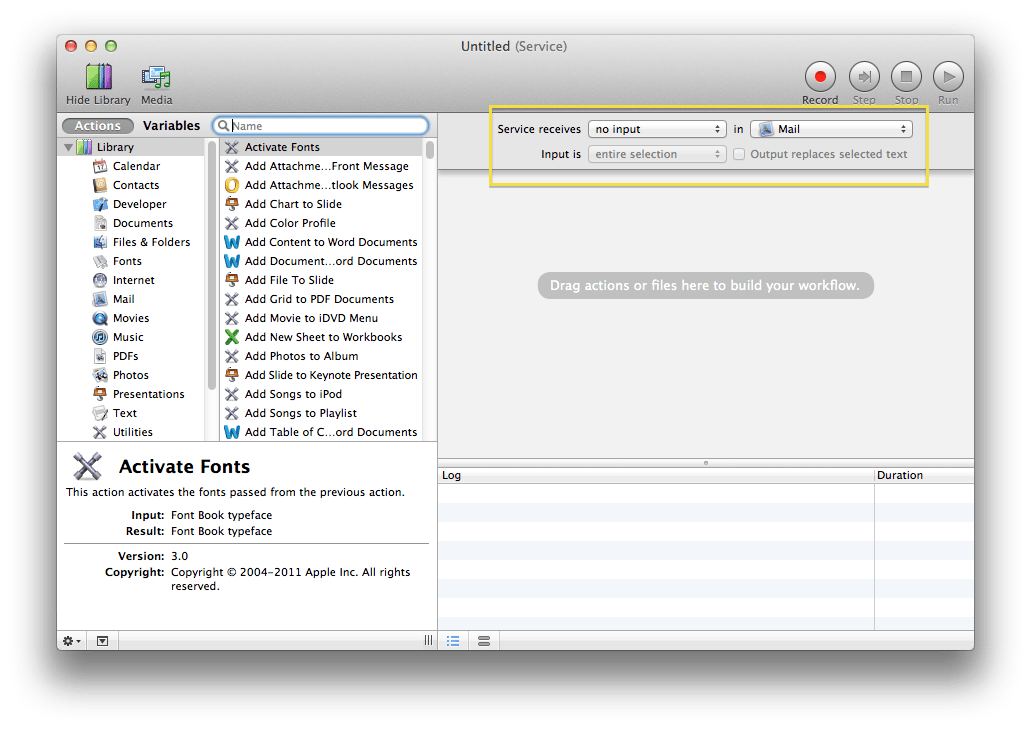
A full screenshot of Apple's Automator application for macOS, presenting an 'Untitled (Service)' workflow. The left sidebar shows the 'Actions' library, with 'Fonts' selected and the 'Activate Fonts' action highlighted. A detailed pane below describes 'Activate Fonts' as activating fonts from a previous action, with 'Font Book typeface' for input and result, version 3.0, and copyright 2004-2011 Apple Inc. The main workflow area, currently empty with the prompt 'Drag actions or files here to build your workflow', prominently displays a yellow-highlighted configuration for the service: 'Service receives no input in Mail', 'Input is entire selection', and an unchecked 'Output replaces selected text'. Standard macOS window controls and workflow playback buttons (Record, Step, Stop, Run) are visible.


Leave a Reply